Provably Fair Dice & Game Center: Gammon42 1.3.1
Gammon42 1.3.1: a dice proof you can check after every online backgammon game, Game Center and Play Games sign-in, and fairer ranked ratings.
You can now check for yourself that the dice in your online backgammon games were not changed. Gammon42 1.3.1, released on October 5, 2026 for iPhone and on October 6 for Android, adds a dice proof after every online game, sign-in with Game Center and Google Play Games so your progress follows you to a new phone, a fairer ranked rating and a News page inside the app. Gammon42 is a free online backgammon app with real opponents, available on iPhone, Android and in the browser.
Download on the App StoreGet it on Google Play
Gammon42 1.3.1 at a glance
| App | Gammon42, version 1.3.1 (iOS and Android) |
| Release date | October 5, 2026 (App Store), October 6, 2026 (Google Play) |
| Fair dice proof | A “Dice verified” badge after every online game, with a proof you can check yourself |
| Dice stats | Your rolls compared with your opponents’ and with the expected odds |
| Sign-in | Game Center on iPhone, Google Play Games on Android |
| Ranked rating | A flatter ELO curve, and smaller swings if you play 50 or more ranked games a week |
| News | A News page inside the app |
| Profile | Redesigned profile and settings, with your Sparks balance |
| At the table | Your opponent’s power-ups are visible, and the official rule for using both dice applies |
Provably fair dice: a proof after every online game
“The dice are rigged” is the oldest complaint in online backgammon. We could answer with statistics, but statistics published by us are still us asking you to trust us. So 1.3.1 gives you something you can check without us.
Here is how it works:
- Before the game starts, the server picks a secret number and sends your app its fingerprint (a SHA-256 hash). The fingerprint doesn’t reveal the number, but the number can no longer be swapped for another one.
- Every roll of the game is calculated from that secret number, together with a random value from each player’s app, the game ID and the roll’s position in the game. The whole sequence of dice is fixed before the first checker moves. It doesn’t depend on the score, on who is ahead or on who you are.
- When the game ends, the server reveals the secret number. Your app recalculates every roll it showed you and compares the result with the fingerprint from the start.
If everything matches, the result screen shows a Dice verified badge. Tap it to see the proof: the fingerprint, the game ID and the number of rolls checked. From there you can copy the whole proof and run it through the Verify it yourself screen, which redoes the calculation on your phone and sends nothing anywhere. The proof is plain text, so you can also check it with your own code.
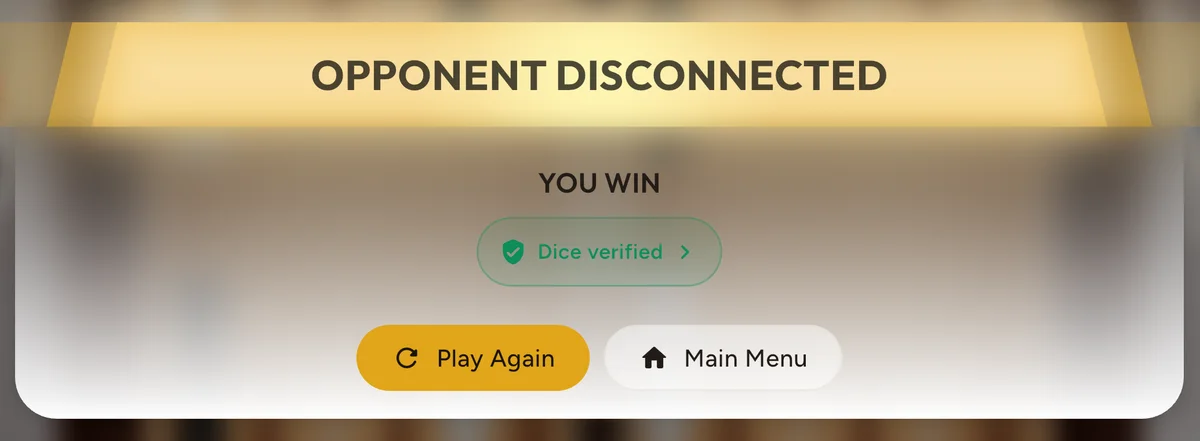
Changing a single die after the game started would mean finding a second number with the same SHA-256 fingerprint. Nobody knows how to do that.
Your dice statistics
The profile and settings screen has a new Dice tab. It reads your rolls straight from the server’s audit log and shows:
- Your doubles, next to the 16.7% that fair dice give.
- Every face: how often each number from 1 to 6 came up for you, with the range fair dice land in at your number of rolls.
- You vs your opponents: doubles rolled by you and by the players you faced, in the same games.
- Games you won vs games you lost. These two really are different, and fair dice are the reason: a double moves four checkers, so the player who rolls more of them usually wins.
- Every player: the same numbers across all the rolls ever made in the app.
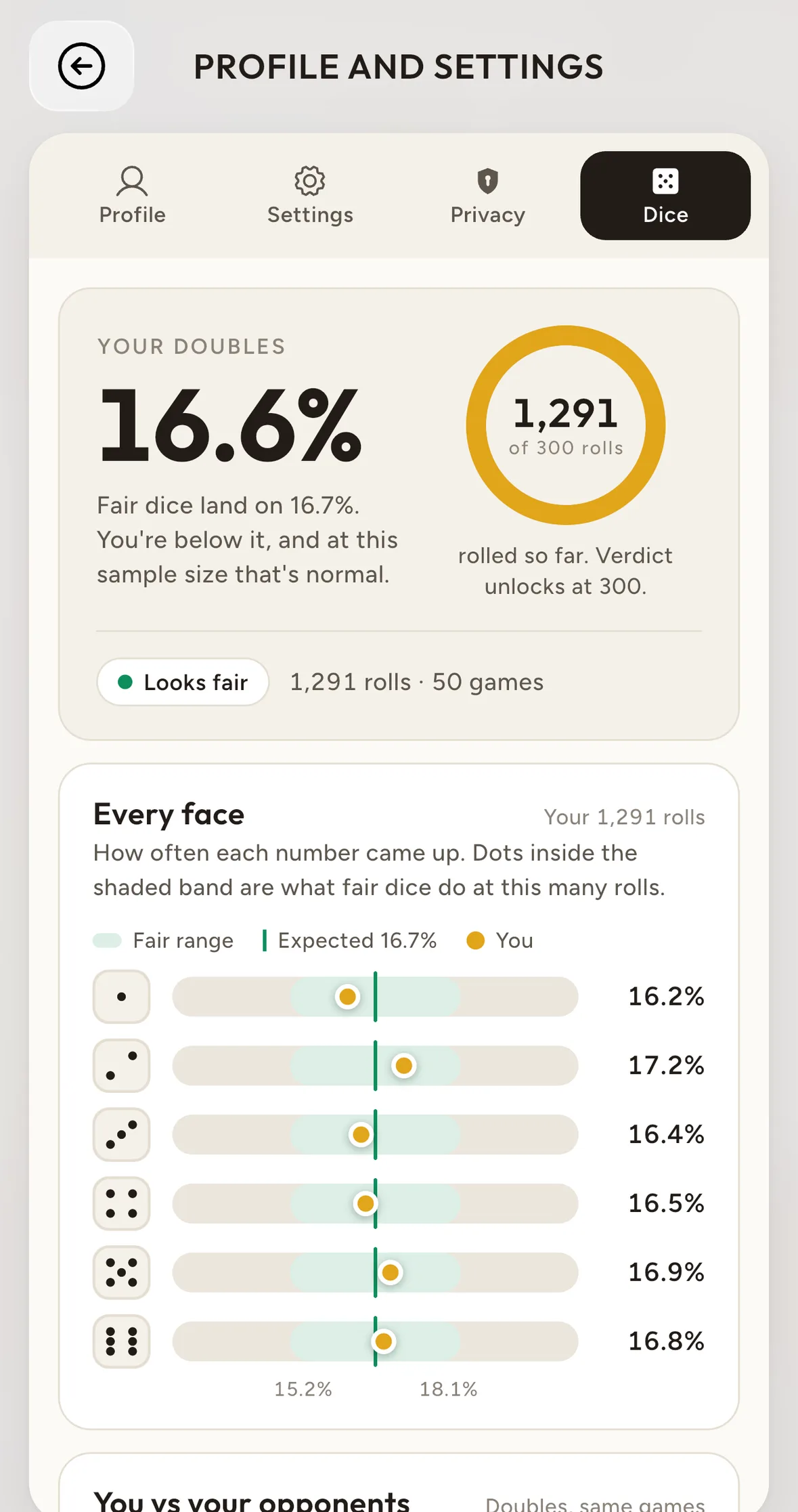
Only online games are recorded. Practice against the computer and pass-and-play games on one device are not, and dice set by power-ups are not counted, because they were not rolled.
Want the details of the random source itself? Read how we roll the dice.
Sign in with Game Center or Google Play Games
You have always been able to play Gammon42 without an account. The downside was that a reinstall or a new phone could leave your progress behind, unless you had linked Apple, Google or Facebook yourself.
From 1.3.1, the app links your game account to Game Center on iPhone and to Google Play Games on Android. When you reinstall the app or move to a new phone, your rating, Sparks, power-ups and friends come back without a password.
- It happens automatically once your account has some progress, for example a game played. An empty account is not linked.
- We don’t receive your email or your name through this link.
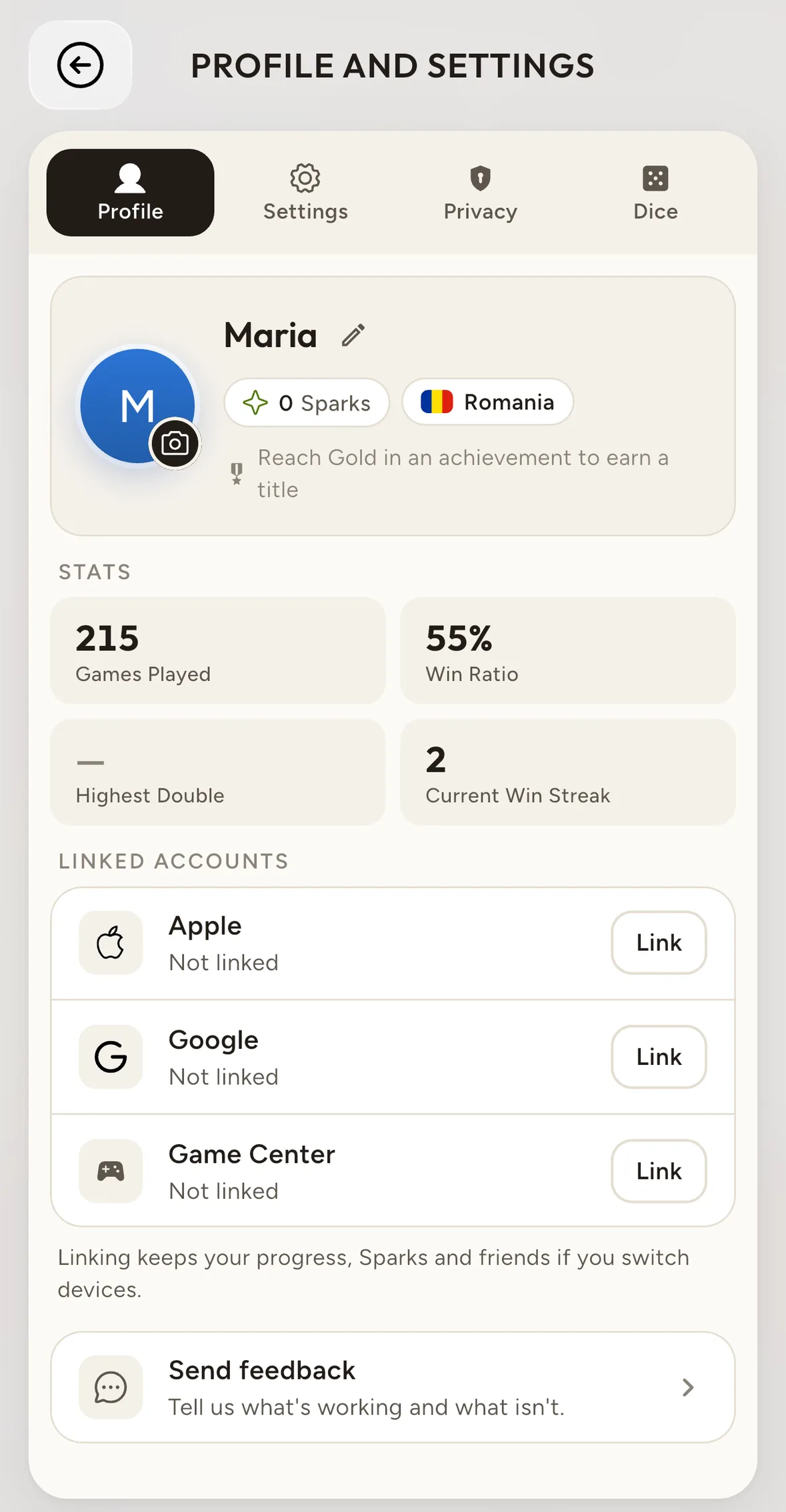
- You can also link it yourself, under Linked Accounts in your profile.
- Nothing is replaced without asking. If the app finds a second account, it shows you both, with their games and points, and you choose which one stays on the device.
- Logging out stops the automatic sign-in on that device.
A fairer ranked rating
We changed two things in how ranked ELO is calculated.
The curve is flatter. The formula now expects less from the favourite. Our ranked data showed strong players winning 57 to 58% of their games while the old curve expected about 60%, so they were losing rating while winning most of their games. Now a player rated 150 points above their opponent is expected to win about 57% of the time. They gain 14 points for a win and lose 18 for a loss.
Smaller swings when you play a lot. If you have played 50 or more ranked games in the last 7 days, each of your games moves your rating half as much. A long week at the board no longer turns a small run of bad luck into a 200-point drop.
Nothing else changed. You still start at 1500, the doubling cube can at most double a change, and gammons and backgammons don’t count toward your rating. The full formula, with tables and the code, is in how ELO rating works in Gammon42.
A News page inside the app
The menu header has a new News button. It opens our announcements and release notes in your language, and a dot on the button tells you when there is something you haven’t read. This article is one of them.
Redesigned profile and settings
The profile and settings screens were rebuilt to be easier to read. Your profile now shows your Sparks balance, with a short explanation one tap away. You earn Sparks by winning Boosted games, and you spend them on tournament entry fees.
At the table
- You can see your opponent’s power-ups. Tap their profile during a game to see which power-ups they have. No more surprises in a Boosted game.
- The official rule for using both dice. If you can play both dice, you have to. If you can play only one of them, it has to be the larger one. The app now applies this rule in every game, online and offline.
- Easier invites. You can invite a friend while you wait for an opponent, the invite screen was redesigned, and a new player sees their progress toward the invite rewards on the Play screen.
Other improvements in 1.3.1
- Tournament reminders. You get one reminder an hour before a tournament you are registered for starts, and another 10 minutes before.
- Announcements in the lobby chat. Messages from our team now show up as announcements in the lobby.
- Lost connections. We reworked what happens when your connection drops during an online game.
- Translations. Every screen is now translated in all 8 languages of the app.
- Plenty of other fixes and polish throughout the app.
In case you missed 1.3.0
Version 1.3.0 came out at the end of September and brought:
- Achievements. Earn Bronze to Diamond badges for your games, tournaments and friendships, and claim power-ups and titles as rewards.
- Boosted Backgammon. Casual games became Boosted games: use power-ups to re-roll, to get the best roll or to set a die to any value.
- Redesigned player profiles, with tournament record, win streak and achievements.
- A new look for tournaments, with clearer entry fees and prize conditions.
How to get the update
If you already have Gammon42, your phone will update it automatically. You can also install version 1.3.1 now from the App Store or Google Play. Prefer your browser? You can play backgammon online for free, right in your browser.
Earlier versions: 1.2.1 brought private tournaments and invite rewards, and 1.2.0 brought public tournaments.
FAQ: Gammon42 1.3.1
Are the dice in Gammon42 fair?
Yes, and from version 1.3.1 you can check it yourself. Before each online game the server publishes a fingerprint of a secret number, every roll is calculated from that number, and at the end the app verifies all the rolls against the fingerprint.
How do I check the dice of a game?
After an online game, tap the Dice verified badge on the result screen. You see the proof, you can copy it and you can check it again on the Verify it yourself screen, or with your own code.
Where do I find my dice statistics?
Open your profile and go to the Dice tab. It shows your doubles, every face, a comparison with your opponents and the numbers for all players.
Do I need an account to play Gammon42?
No. You can play right away without an account. From 1.3.1 the app links your progress to Game Center on iPhone or Google Play Games on Android, so it comes back after a reinstall or on a new phone.
Does Gammon42 get my email through Game Center or Play Games?
No. We don’t receive your email or your name through Game Center or Google Play Games.
What changed in the ranked rating in 1.3.1?
The ELO curve is flatter, so strong players no longer lose rating while winning most of their games. If you play 50 or more ranked games in 7 days, each game moves your rating half as much.
Got an idea for the next version? Write to us at support@table-online.ro.
Good dice! 🎲
Read also: How we roll the dice · How ELO rating works · Play backgammon online: the complete guide
Ready to play?
Play Now